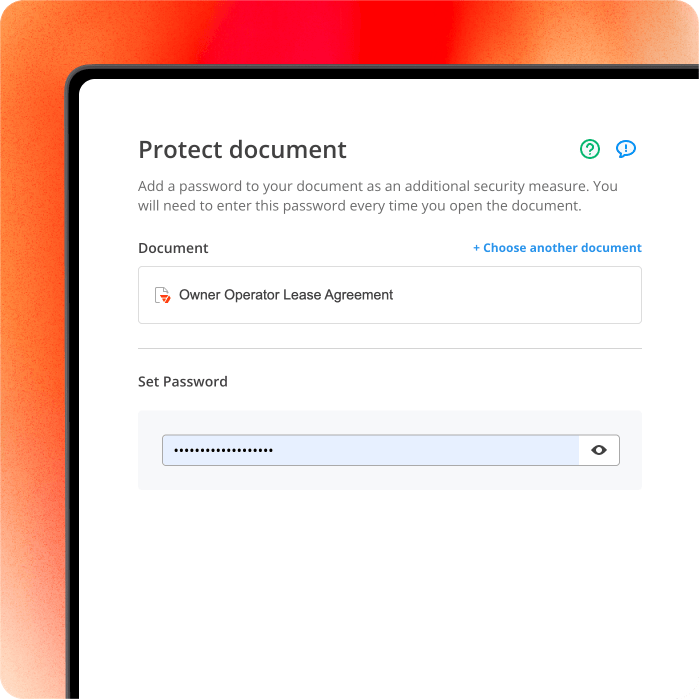
Unlock PDF and Remove Password from PDF for Website
Unlock PDF files quickly and securely using pdfFiller's Protect Document feature.
What is Unlocking a PDF?
Unlocking a PDF refers to the process of removing restrictions that prevent access to certain documents. This process is essential for accessing restricted documents, especially when dealing with contracts and sensitive files. By unlocking PDFs, small and medium businesses can gain immediate access to vital information without the need for software installation. This ease of access is crucial in maintaining workflow efficiency while ensuring document security.
How to Access the Unlock PDF Feature
To access the Unlock PDF feature in pdfFiller, navigate to the Tools section located in the top menu. From there, select Protect Document from the dropdown menu. This feature is designed to be user-friendly and is available on all devices, ensuring that you can unlock your PDFs from anywhere.
Steps to Unlock a PDF
- Open the password-protected PDF file you wish to unlock.
- Enter the existing password to unlock the document.
- Once the password is verified, access the document immediately after unlocking.
- Ensure that the PDF format is compatible, as pdfFiller supports all PDF formats.
- Review the unlocked document to confirm that all content is accessible.
- Save the unlocked PDF for future use or sharing.
- Consider using the Protect Document feature again if you need to re-secure the file.
Protecting Specific Pages vs. Entire Document
When unlocking a PDF, you have the option to protect either the entire document or specific pages. It’s important to consider the sensitivity of the content on each page. If certain pages contain confidential information, you may choose to protect only those pages while leaving the rest accessible. This flexibility allows you to tailor document security to your specific needs.
Using the Confidential Folder
To securely store sensitive documents, pdfFiller offers a Confidential Folder feature. Accessing this folder requires phone verification and a custom password, ensuring that only authorized users can view the contents. Additionally, documents stored in this folder are hidden from main lists, providing an extra layer of privacy.
Creating a Read-Only PDF for Recipients
When sharing PDFs, you can create a read-only version to prevent recipients from making edits. This is particularly useful for contracts and agreements, ensuring that the original terms remain intact. By protecting the document, you maintain control over its content while allowing others to view it securely.
When to Unlock a PDF
Unlocking a PDF is common in several scenarios, such as when dealing with legal contracts and HR documents. It is also useful for accessing financial records and personal identification documents. Recognizing when to unlock a PDF can help streamline your workflow and ensure that you have access to necessary information when needed.
Browser Compatibility for Unlocking PDFs
The Unlock PDF feature in pdfFiller is compatible with all major browsers, ensuring that you can access it regardless of your preferred platform. Additionally, it works seamlessly on mobile devices and tablets, allowing you to unlock PDFs on the go without any issues.
Limitations of Unlocking PDFs
While unlocking PDFs is a straightforward process, there are limitations to be aware of. Maximum password length and encryption standards may apply, which can affect your ability to unlock certain documents. Additionally, some features of pdfFiller may require a subscription, so it’s important to check your account status before proceeding.
How Does pdfFiller Compare?
pdfFiller stands out against competitors like ilovepdf, which offers a range of PDF tools but lacks the intuitive interface of pdfFiller, making it less user-friendly. Smallpdf provides basic PDF functions but charges for advanced features, which may not be cost-effective for frequent users. Adobe Acrobat is the industry standard with extensive features, but it is often too complex for small and medium businesses, leading to higher costs and requiring technical knowledge.
Next Steps to Unlock Your PDF
Start unlocking PDFs in minutes with pdfFiller. There is no software installation required, making it easy for small and medium businesses to manage their documents efficiently. Take advantage of this user-friendly solution to enhance your document workflows today.